Chrome Extension

Stop scrolling.
Harvest the code.

AI chats bury code blocks in walls of text. AI Code Harvester finds every code block for you, jumps you straight to it, and downloads exactly what you pick — as a ZIP, ready for your project.

How It Works

Three steps. Zero friction.

01

Jump to any code block

One click teleports you straight to any code block in a long chat — skip all the text around it.

02

Pick what you need

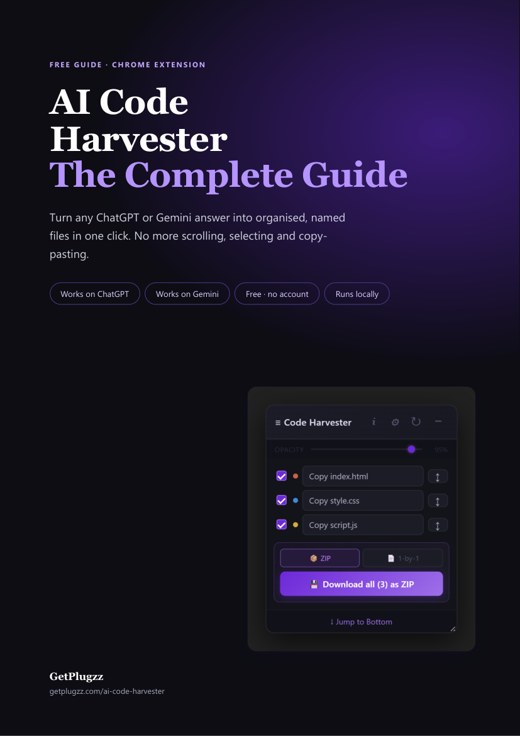
A floating panel lists every code block. Tick the ones you want, then copy or download them.

03

Export as ZIP

Download your files as one ZIP, correctly named and ready to drop into your project.

Features

The ultimate code companion.

Gemini & ChatGPT

Works the same way on both — no setup differences.

Checkbox Selection

Tick exactly the files you want. Nothing you don't need.

Smart File Naming

Figures out the right filename and extension for each file automatically.

Live Typing Detection

Shows you when the AI is still writing, so you know exactly when the code is ready.

Draggable & Resizable Panel

Move it, resize it, collapse it — stays exactly as you left it, session after session.

Copy-Prompt Helper

One click copies a ready-made instruction into your chat, so filenames come out accurate every time.

Flexible Downloads

Grab everything as one ZIP, download files one by one, or copy a single block instantly.

Privacy Native

Runs on your computer only. Nothing about your chats is ever sent anywhere.

FAQ

Common questions.

Chrome extensions are small programs that add features to your browser — a code extraction tool, an ad blocker, a screenshot tool, and so on. You install them from the Chrome Web Store (chromewebstore.google.com): search for the one you want and click "Add to Chrome." No separate download, account, or file to run — it shows up as an icon in your toolbar, like AI Code Harvester.

Most are free to install and use, AI Code Harvester included — jumping between code blocks, selecting files, and ZIP export all work with no payment or account. It has no paid tier at all: it's free, full stop.

Yes — it works the same way on both Google Gemini and ChatGPT, with the same panel and features on each.

No. It only looks at code blocks on the page to pull them out. Nothing is ever sent anywhere.

Any language the AI writes — HTML, CSS, JS, TypeScript, Python, Markdown and more. It picks the right file extension automatically.

No. It only does anything when you click it — zero impact the rest of the time.

Get Started

Turbocharge your workflow today.

Free forever. No account needed. Works on Gemini and ChatGPT.

Add to Chrome — It's Free All extensions →

Fast · Reliable · Private