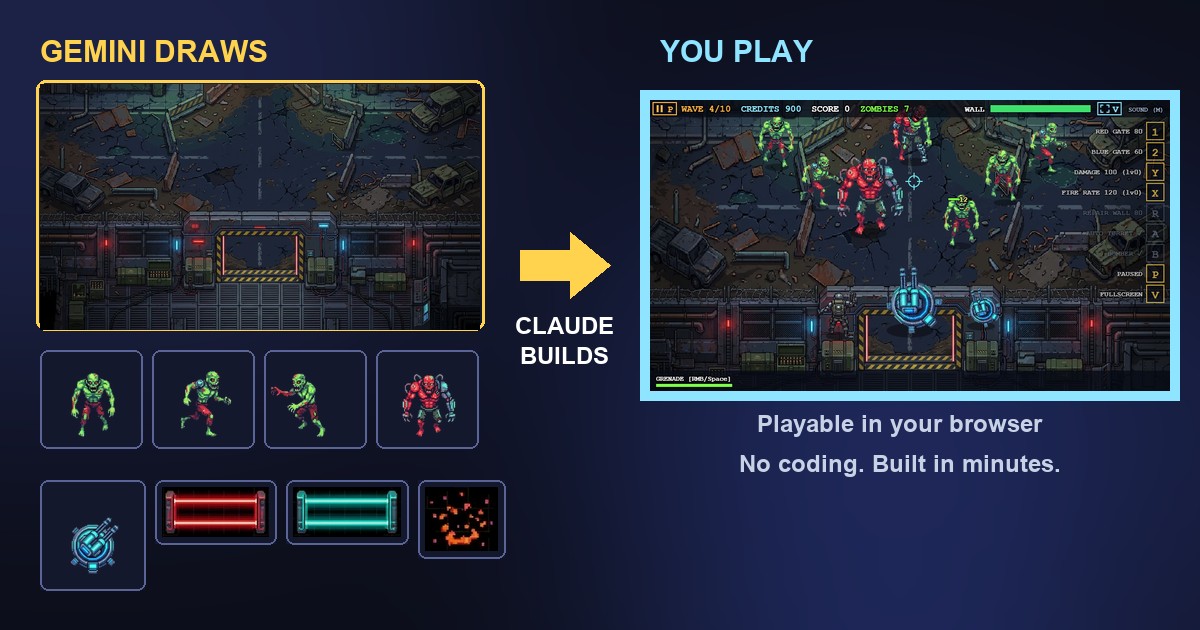
You can make a playable game with AI without writing any code: ask Gemini to draw the pictures, give them to Claude to turn into a game, and play it in your browser. The first playable version of the game below was ready in under 10 minutes. A game like this used to take a few weeks.
This is the game I am talking about. Click it once, then play: left click shoots, right click throws a grenade. There is a full screen button in the top bar.
The idea: one AI draws, another AI builds
A chat AI is very good at writing the code of a small game, but it cannot draw you a moody ruined city, a pack of zombies and a laser turret in one style. An image AI can draw all that, but it cannot make the pictures move. So I used two tools and gave each the job it is best at.
- Gemini drew the pictures: the background, the zombies and the weapons.
- Claude took those pictures, cut them into separate pieces, built the scene and made the levels.
You are not tied to these two. Any AI that makes pictures can do the drawing, and any chat AI that writes code can do the building. ChatGPT and Gemini can write the code part too, and they are fine for simpler games made of plain shapes and colours. The pictures are what make a game look like a real game.
What you need
- An AI that makes pictures (I used Gemini).
- A chat AI that writes code (I used Claude; ChatGPT or Gemini work too).
- The Chrome browser. You do not need to install any programs.
You can start for free, but free plans have daily limits on pictures and messages, and the rules differ from plan to plan. Many image tools allow commercial use of the pictures only on a paid plan, so read what your plan says if you plan to share or sell your game. This post is about how to make a game quickly with AI, not legal advice.
For hosting, the place on the internet where the game is stored so that anyone can open it, I used my own website, the one you are reading now. You can do the same with your own site, and there are other options too, which I explain further down.
If you do not have a website yet, you need hosting first. One simple way is Bluehost. It is a hosting company whose AI builder bundles hosting with a starting website, so you skip the blank page, and most hosting plans let you upload your own files, such as a single game file. Check their page for current plans and prices before you decide, because offers change.
Step 1: Decide the game, then ask the image AI for the pictures
Before you draw anything, think about what kind of game you want. A tower-defence game where you hold a wall against enemies, a space shooter, a maze, a card game? And what should it look like: a dark ruined city, a bright forest, outer space? Which characters do you need: a hero, a few enemies, a boss? You do not have to decide all of this alone. Ask the AI for ideas first, and it will give you a handful in seconds.
Pick the idea you like best, change anything you want, and now you know exactly which pictures to ask for. A simple game needs three kinds: a background, the enemies and the weapons. Ask for each one separately, and always ask for the same style, so everything looks like it belongs together. Here is the kind of request that works.
One thing I learned: if you ask for a “transparent background”, many image tools paint a fake grey-and-white checkerboard into the picture, as if it were part of the drawing. A plain flat colour works better. Claude can remove it afterwards.
Step 2: Give the pictures to the chat AI
Open Claude, attach the pictures and describe the game in plain words. You do not have to know how a game works. Say what you want to see and do, and let the AI worry about the code. For example:
In my case Claude cut the sheets into pieces, placed the background, built the scene and wrote the levels. A few minutes later the first version could already be played. Then I spent more time on extras, which is step 4.
Step 3: Play it, without saving anything
Claude shows many answers in a preview right in the chat. If your code came from ChatGPT or Gemini instead, there is an even quicker way: AI Code Harvester, our free Chrome extension, finds the code in the answer, and the Show button runs it live in a new tab. You do not save a file or copy and paste anything.
This makes Harvester a powerful add-on for anything that can run in the browser without saving files: a game, a small tool, a page design. You ask, press Show, look at the result, ask for a change and look again. It works on ChatGPT and Gemini pages, and our guide How to run HTML code from ChatGPT or Gemini and preview the page live explains it step by step.
Step 4: Improve it one request at a time
The first version is never the final one, and that is the fun part. After the first version I changed the game with plain requests, one at a time. Some of them:
- “Show small key letters at the edge of the screen, with a short text, so the player knows which key buys what.”
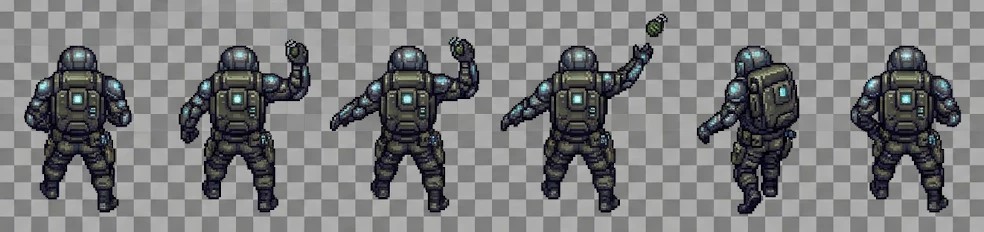
- “Add a soldier who throws grenades at the nearest zombie by himself.” I gave Claude new pictures of him from Gemini.
- “Add an automatic turret that aims and shoots on its own, but slower than the main one.”
- “Zombies should lose energy only when hit in the body or head, not the legs.”
- “Add a pause button in the top left corner and a full screen button.”
- “Make the last wave much bigger.”
The rule that saves the most time: ask for one change, test it, then ask for the next. If something breaks, say “undo the last change”. The AI remembers what it did and can fix it.
Test it on your own computer before putting it online
Before you share the game, try it at home, where nobody sees the mistakes. A game like this is a web page, and your computer can open it without any server.
- Save the code as one file, for example
game.html. If the game uses pictures from a folder, keep the folder next to the file. Or ask the AI: “Put the pictures inside the file, so it is a single file.” Then there is nothing to lose. - Double-click the file. It opens in your browser.
- Click the game once, then use the keys. The browser needs that first click before the game can hear the keyboard.
- Check everything: the mouse and the keys, the sound, full screen, pause, and whether you can play it to the end.
- Fix what is wrong by telling the AI exactly what you saw.
When it works, put it online so others can play. For that you need web hosting, which is simply a place on the internet that stores your files and gives them an address. A single game file works on almost any host, including free ones. Our guide Where to publish the web page your AI made goes through the options in plain words. On our own site we use Firebase Hosting.
To show the game inside a page of your own site, add it like this:
<iframe src="https://yoursite.com/game.html" width="1024" height="572" allow="fullscreen"></iframe>The allow="fullscreen" part lets players use the full screen button. If you upload a new version and still see the old one, press Ctrl+F5 to make the browser load it fresh.
There is no limit
Once the base is there, everything else is a request away: a new enemy, a new background for the next level, a harder boss, a different weapon, a new kind of game. For a new look, ask the image AI for another set of pictures and give them to the chat AI. What once needed a team and weeks of work now needs an evening and some imagination.
Good to know before you start
- The AI makes mistakes. Something will not work the first time. Describe what you see and ask again; this is normal.
- The first version is quick, the polish takes longer. The first playable version of my game took under 10 minutes. The extras came afterwards.
- Games like this are made for a mouse and keyboard. For a phone, ask the AI for touch controls.
- Rules about pictures differ. Check what your image tool and plan allow before you sell or advertise a game.
What you do with the game is up to you
When the game is ready, it is yours to decide what happens next. Share it on social media, send the link to friends, put it on your own website, or keep it just for yourself. There is no right answer, and the fun is that you made it.
FAQ
Yes. You describe the game in plain words, the AI writes the code, and you test the result and ask for changes. You do not need to understand the code, only to say what you want to see.
You can start for free, but free plans have daily limits on pictures and messages, and a bigger game can take more than one day on a free plan. Many image tools also allow commercial use of the pictures only on a paid plan, so check your plan.
Any AI that makes pictures can draw them, and any chat AI that writes code can build the game. I used Gemini for the pictures and Claude for the game. ChatGPT and Gemini can write the code too.
For a simple game made of shapes and colours, yes. For a game with real artwork you need pictures from an image AI, which you then give to the chat AI to build into the game.
Yes. A game like this is usually one HTML file, which works on almost any web host, including free ones. You can also show it inside a page with an iframe.
Games made like this are built for a mouse and keyboard. If you want it on a phone, ask the AI to add touch controls.
That depends on the rules of the tools you used for the pictures and the code, and they differ by plan. This post does not give legal advice, so read the terms of your tools before you sell or advertise a game.
AI Code Harvester — Free, Local, No Account
Made by GetPlugzz. Local processing only: nothing is uploaded, nothing is tracked.