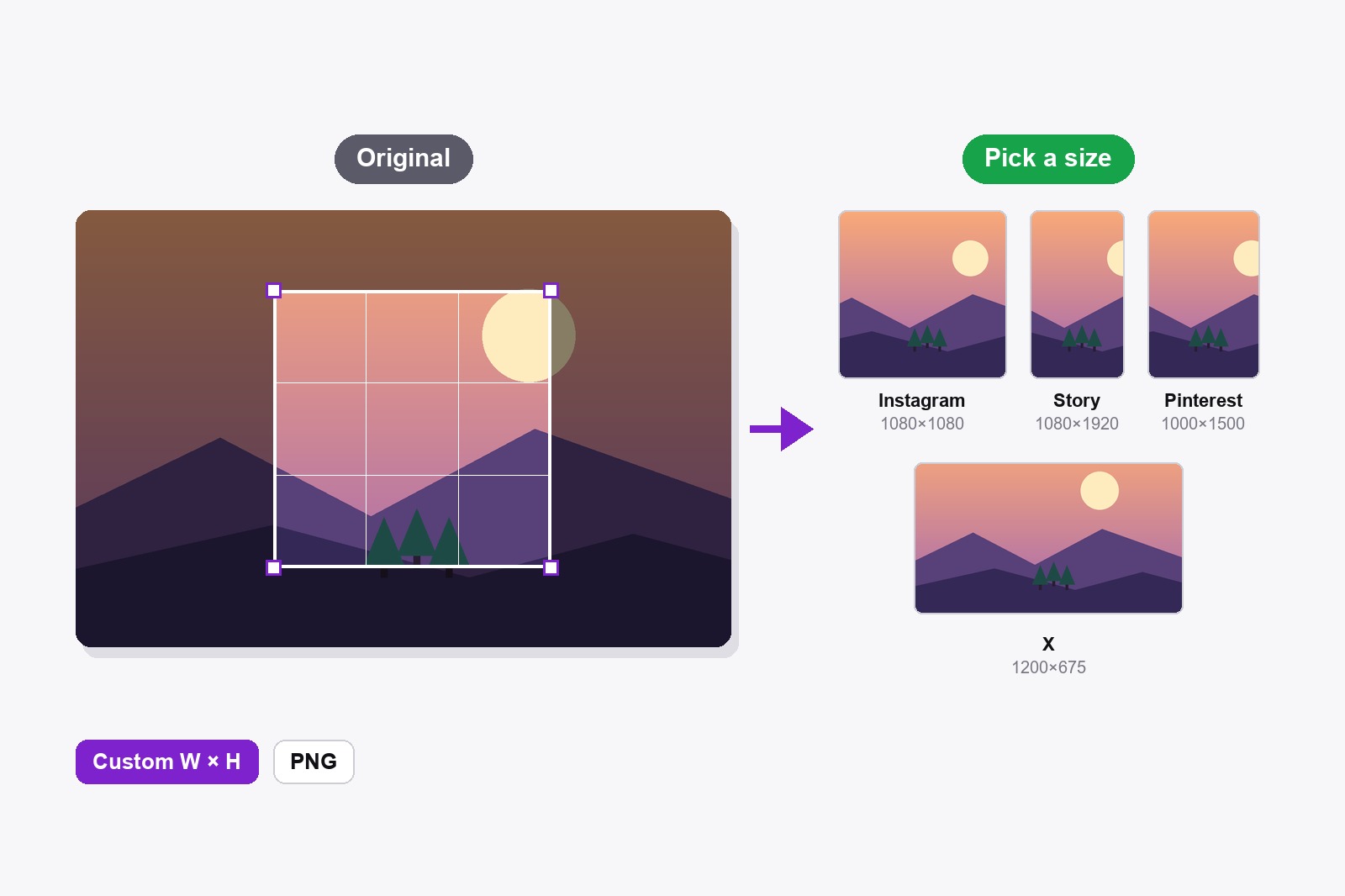
To crop a picture to fit Instagram, open it in the free Scrollshot editor, click the Crop icon, pick Instagram Post (1080×1080) or Instagram Story (1080×1920), move the box over the part you want to keep and click Download. The file comes out at exactly that size, so nothing gets chopped off when you post it. Pinterest, X, LinkedIn, Facebook and YouTube work the same way. It all runs in your browser and nothing is uploaded.
Why your picture never seems to fit
Every platform wants its own shape: square on one, tall on another, wide on a third. Post a photo in the wrong shape and the app crops it for you, usually straight through somebody’s head or the text you added. Crop it yourself first and you choose what stays. The box is locked to the right shape, so you can’t accidentally drag it into a size the platform would not like.
How to crop an image to an exact size, step by step
- Install Scrollshot. Get it from the Chrome Web Store. It is free and needs no account.
- Open your picture in the editor. Capture a page (full page, visible area or region), or click Upload and open any photo or image from your computer.
- Click the Crop icon in the left toolbar (its tooltip says Crop to preset). A list called Crop Preset opens.
- Pick a size. There are ten: Pinterest 1000×1500, Instagram Post 1080×1080, Instagram Story / TikTok 1080×1920, X Post 1200×675, X Header 1500×500, Facebook / OG Post 1200×630, Facebook Cover 820×312, LinkedIn Post 1200×627, LinkedIn Cover 1584×396 and YouTube Thumb 1280×720. Need something else? Type your own width and height (up to 9999) at the bottom and click Apply.
- Move the box. It appears in the middle of the picture, already in the right shape. Drag it onto the part you want to keep, or drag a corner to make it bigger or smaller. The shape stays locked.
- Check the label in the bar at the bottom. It shows the name and the final size, for example Instagram Post · 1080×1080 px.
- Save it. Download gives you a PNG named after the preset (like instagram-post-crop.png). Save to History keeps it in your gallery.
- Or click + Add frame to put the cropped picture on a plain light background. The cropped picture reopens in a fresh editor with the Backdrop panel open, so you can pick a gradient, a frame and a shadow. When you download it, Scrollshot asks if you want to keep the final size at the preset size, frame included.
Which size for which platform
- Instagram Post (1080×1080). A square, for the normal feed.
- Instagram Story / TikTok (1080×1920). The tall phone-screen shape. Use it for anything that fills a phone.
- Pinterest (1000×1500). Pins are tall, and 1000×1500 is the usual 2:3 shape.
- X Post (1200×675) and X Header (1500×500). A wide picture for a post, and a very wide strip for the profile banner.
- Facebook / OG Post (1200×630). The shape of a Facebook post and of the preview picture that shows when someone shares a link. Facebook Cover is 820×312.
- LinkedIn Post (1200×627) and LinkedIn Cover (1584×396). A feed picture and the wide banner on your profile.
- YouTube Thumb (1280×720). The standard 16:9 thumbnail.
Two things to know. The sizes are the ones the platforms recommend right now, and they change now and then, so if one moves, type the new size under Custom. And the box is scaled to the final size, so start from a big enough picture: a tiny area cut out of a small photo gets stretched and comes out soft.
Quick recipes for common jobs
One photo for several platforms: crop it once per preset. Download names each file for you (instagram-post-crop.png, pinterest-crop.png), so they don’t overwrite each other. A screenshot for X or LinkedIn: capture it, crop it to 1200×675 or 1200×627 and add a background. A Pinterest pin from a screenshot: pick Pinterest, then + Add frame to put it on a coloured background. A link preview picture: Facebook / OG Post, 1200×630. Hide anything private first with blur, then crop.
Who crops pictures to exact sizes
- Bloggers and small shops who need the same photo in three shapes for three platforms.
- Creators making thumbnails, story frames and pins without opening a design app.
- Founders and marketers sharing a product screenshot on X and LinkedIn.
- Job seekers who need a profile photo or banner that is not cut off by the site.
- Anyone who is tired of the app choosing which part of the picture gets cut.
Combine it with the other tools: add arrows and numbered steps first, then crop. If you only need to make the whole picture smaller without cutting anything, use the image resizer instead.
Good to know before you start
- The box is locked to the preset shape. You can move it and resize it from a corner, but the proportions never change.
- The file comes out at exactly the preset size. The area inside the box is scaled to 1080×1080 (or whatever you chose), so start from a big enough picture.
- Other tools wait while you crop. Drawing tools, Backdrop and Before/After are switched off until you download, save or cancel, and Undo and Redo are hidden.
- Not in the list? Type your own size. Custom takes any width and height up to 9999 pixels.
- Free crop is a separate tool. For any shape you like, use the Crop tool among the drawing tools: drag a rectangle and click Apply Crop.
- It is free and stays on your computer. No account and no upload, and it does not work on Chrome’s own pages or the Chrome Web Store.
FAQ
Open the image in the Scrollshot editor, click the Crop icon and pick a preset, or type your own width and height and click Apply. Move the box over the part you want and click Download. The file is exactly that size.
Pick Instagram Post for a square (1080×1080) or Instagram Story for a tall picture (1080×1920). Move the box over the part you want to keep and download it.
Yes. Type your own width and height at the bottom of the Crop Preset list (up to 9999 pixels each) and click Apply.
The area inside the box is scaled to the final size. If you cut a tiny piece out of a small picture, it gets stretched. Start from a bigger picture or make the box bigger.
Yes. Capture the page, or upload any image, and the crop presets work in exactly the same way.
Yes. Use the separate Crop tool among the drawing tools: drag any rectangle on the picture and click Apply Crop.
Yes. All ten presets and the custom size are free, with no account.
No. Scrollshot works locally in your browser, so your picture never leaves your computer.

Scrollshot — Capture Exactly What You Need
Made by GetPlugzz. Local processing only: nothing is uploaded, nothing is tracked.